Agents
hal0 doesn’t build its own agent runtime — it bundles one, and hal0’s job is to run it safely: as a sandboxed service, shaped by a persona that controls what it can do, with a human in the loop for risky actions and a spending cap for paid calls. A second, distinct piece — the hal0-brain steward — is hal0’s own small model driving hal0’s own admin tool catalog. The two are easy to conflate; they aren’t the same thing.
Hermes: the bundled agent runtime
Section titled “Hermes: the bundled agent runtime”As of v1.0, Hermes is the only bundled agent — BUNDLED_AGENTS = ("hermes",).
Earlier speculative bundles (pi-coder, opencode) were removed; the codebase
still carries the machinery to install-by-shelling-out to
installer/agents/<name>.sh the way those did, in case a future bundle is
added the same way, but nothing currently populates that beyond Hermes.
The agent runs as a systemd template unit, hal0-agent@<id>.service (so
Hermes is hal0-agent@hermes). It runs as the unprivileged hal0 system
user the installer creates, under a tight sandbox: no new privileges, a
read-only system with only hal0’s own directories writable, a private temp
dir, and a watchdog. Crucially, the agent’s secret files stay root-owned and
unreadable to the hal0 user, so the agent can’t read its own credential
store even though it can write to hal0’s data paths.
The agent process binds to loopback only. The browser never talks to it
directly — hal0-api proxies the chat connection, enforcing an origin
allowlist and a session cookie on every WebSocket upgrade, and carrying the
embed token in an Authorization header rather than a URL. The agent reaches
hal0’s own inference and admin surfaces through environment hal0 writes for
it (the API URL and the admin/memory MCP URLs).
hal0-brain: the steward that drives hal0 itself
Section titled “hal0-brain: the steward that drives hal0 itself”Separately from the bundled agent runtime, hal0 runs its own brain
steward — a small, always-available model (tuned via the dedicated brain
profile) whose job is routing tool calls against hal0’s own curated
hal0-admin MCP tool catalog, not general-purpose coding or chat. It’s the
mechanism behind features like the Operator Board, and it’s deliberately kept
1:1 with a small model rather than sharing a slot with the general agent’s
model — the steward handles its own tool-call turns, including routing
specific rounds to a dedicated tool_model where that’s a better fit than
the conversational model.
Where Hermes is “a general-purpose agent hal0 governs,” hal0-brain is “hal0’s own operator, wired straight into the admin surface.” Both speak MCP and both go through the same approval queue for anything gated.
Personas: the agent’s character and limits
Section titled “Personas: the agent’s character and limits”A persona is the unit that shapes the bundled agent. It is a small TOML file that carries a system prompt, a tool-gating policy, a memory namespace, a preferred upstream/model, and a spending budget. Switching personas changes the agent’s behaviour on its next turn — without restarting the process.
The tool-gating policy is what makes a persona a safety boundary. It’s a
three-tier ToolPolicy — allow, gated, never (block) — expressed as
glob lists per tool, and the three lists are hard-validated as disjoint at
load time: a tool pattern can’t simultaneously be allowed and blocked, so a
misconfigured persona fails to load rather than silently picking one
behaviour. The seed defaults are conservative: read-style tools (memory
reads, searches, slot reads) auto-approve, while file, shell, and admin tools
require approval.
The MCP policy layer
Section titled “The MCP policy layer”hal0 doesn’t reimplement the MCP wire protocol for its bundled agent — Hermes
does that wire work itself. What hal0 adds is a client-side policy layer
(AgentMCPClient) sitting in front of it:
classify(server, tool)→allow | gated | blocked | unknown_server | unknown_tool, checkingblockedfirst for defense in depth even though the schema validator above already enforces the lists are disjoint.guard(server, tool)raises a hard error on a rejected call before it ever reaches the wire.- Bearer tokens for outbound MCP calls are resolved from environment or a systemd credential at process start — never from TOML on disk.
- A filesystem-MCP path guard rejects any
../or absolute-outside-workspace path before the call goes out, closing a sandbox-escape class of bug at the client rather than trusting the server alone.
The approval queue: a human in the loop
Section titled “The approval queue: a human in the loop”Privileged actions don’t just execute. The MCP admin server classifies its tools into autonomous and gated sets — gated tools include model pulls and deletes, slot create/delete/restart, capability changes, config writes, credential writes, and applying/importing/deleting a stack or profile (those last four reconfigure the whole inference surface or drop a saved catalog entry, so they’re gated the same way slot and capability changes are). When the agent invokes a gated tool, it doesn’t run; instead it enqueues an approval and returns a “pending approval” result.
That queue is a single source of truth read by three surfaces: the dashboard’s
approval bell and inbox, the hal0 agent approvals CLI, and the approval REST
API. Approving an entry actually runs the deferred action; denying it just closes
it. The queue de-duplicates — a repeated request for the same target bumps a
counter rather than stacking entries — and every gated and autonomous invocation
is audited so you can see exactly what the agent did and what’s waiting on you.
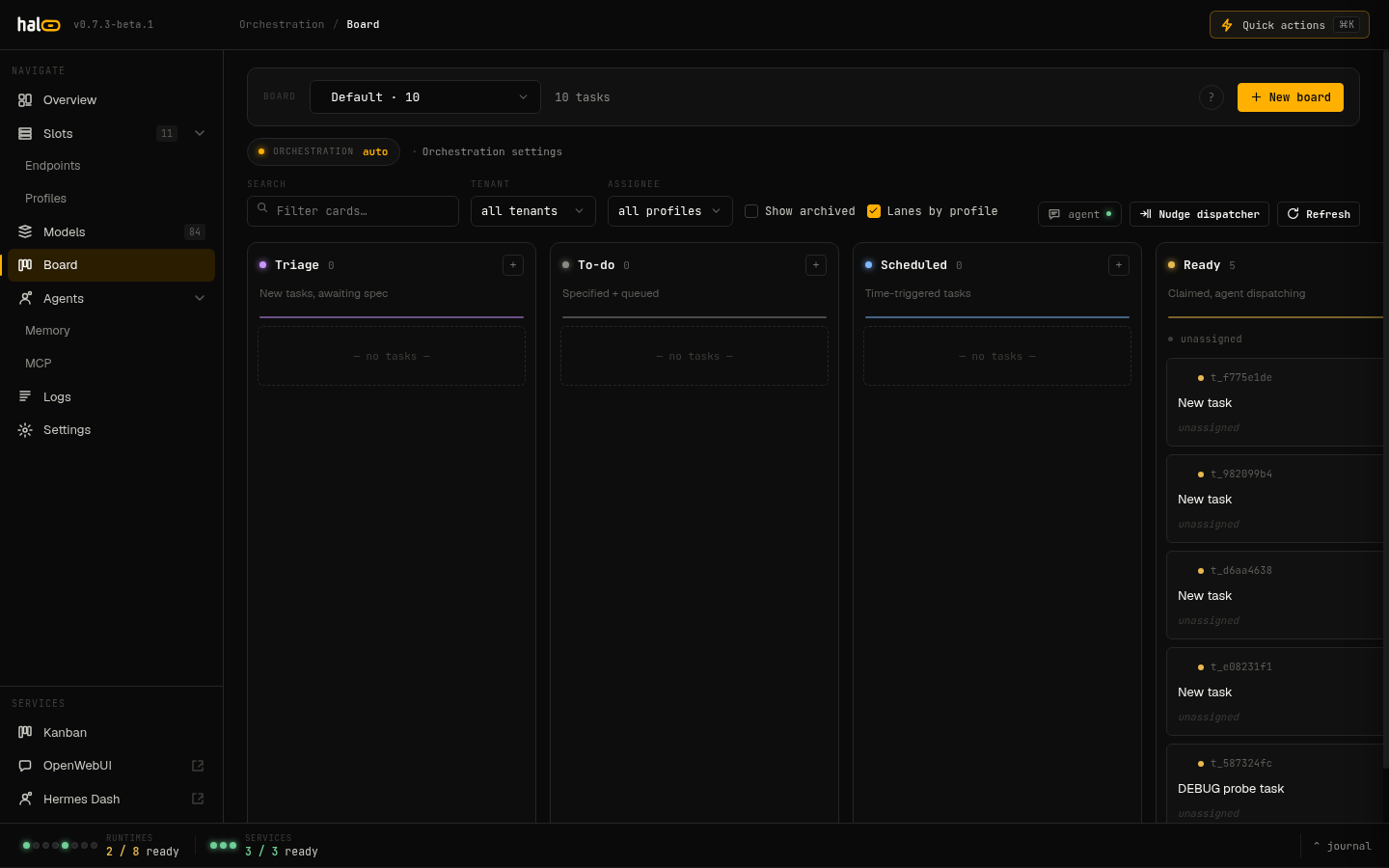 The Operator Board orchestrates agent tasks across lanes (Triage, To-do, Scheduled, Ready, In-progress, Blocked, Review, Done); gated tool calls still pause for human sign-off before they run.
Spending budgets
Section titled “Spending budgets”For agents that can make paid calls (such as routing to an external provider —
hal0’s provider catalog already covers OpenAI, Anthropic, Google AI Studio, and
OpenRouter), each persona can carry a budget. The budget supports per-call,
daily, monthly, and lifetime caps, and a hard_cap flag that decides whether
overshooting is denied or merely logged. Spend is recorded to an append-only
per-persona ledger, and a dedicated check/charge API lets a paid-call path
consult the most-restrictive applicable cap before spending and record the real
charge afterward — the gate a paid-upstream integration needs to avoid an
unbounded bill.
Agent memory
Section titled “Agent memory”When the memory subsystem is enabled, the agent gets
a per-agent memory namespace (e.g. private:hermes) it reads and writes
through MCP — five tools: memory_add, memory_search, memory_list,
memory_delete, and memory_recall. Because memory is opt-in, the agent’s
memory surface degrades cleanly when it’s off: the per-agent memory stats
simply report as unavailable rather than erroring, so an install without
memory still runs the agent normally.