Enable memory
hal0’s memory subsystem gives agents a persistent recall store —
Hindsight — plus an optional knowledge-graph extraction layer. As of
v1.0 it’s toggled with the hal0 memory CLI rather than an environment
variable — the old HAL0_MEMORY_ENABLED flag is gone.
Turn it on or off
Section titled “Turn it on or off”hal0 memory statushal0 memory enablehal0 memory disableToggles [memory].enabled in hal0.toml; enabling requires a
hal0-api restart to actually construct the memory provider.
When enabled, hal0 builds the memory provider from your config. The engine is Hindsight; if the Hindsight daemon is unreachable at startup, hal0 logs a warning and degrades to an in-memory PgVector fallback rather than failing startup.
One shared bank, or per-agent private banks
Section titled “One shared bank, or per-agent private banks”[memory].unified_bank (default true) routes all memory into one
shared Hindsight bank instead of splitting it per agent into private
banks. This is a config-level policy decision, not something you toggle
per request — see MCP servers for how
X-hal0-Private interacts with it at write time.
The graph-extraction gate
Section titled “The graph-extraction gate”Storing recall items is one thing; running an LLM over them to extract a knowledge graph is heavier and separately gated — off by default even on a fresh install.
Hindsight builds its graph natively from whatever local llm slot you
point it at. That slot is [memory.graph].extraction_slot in
hal0.toml (default "utility"); changing it repoints Hindsight’s
extraction LLM and restarts hindsight-api to apply it.
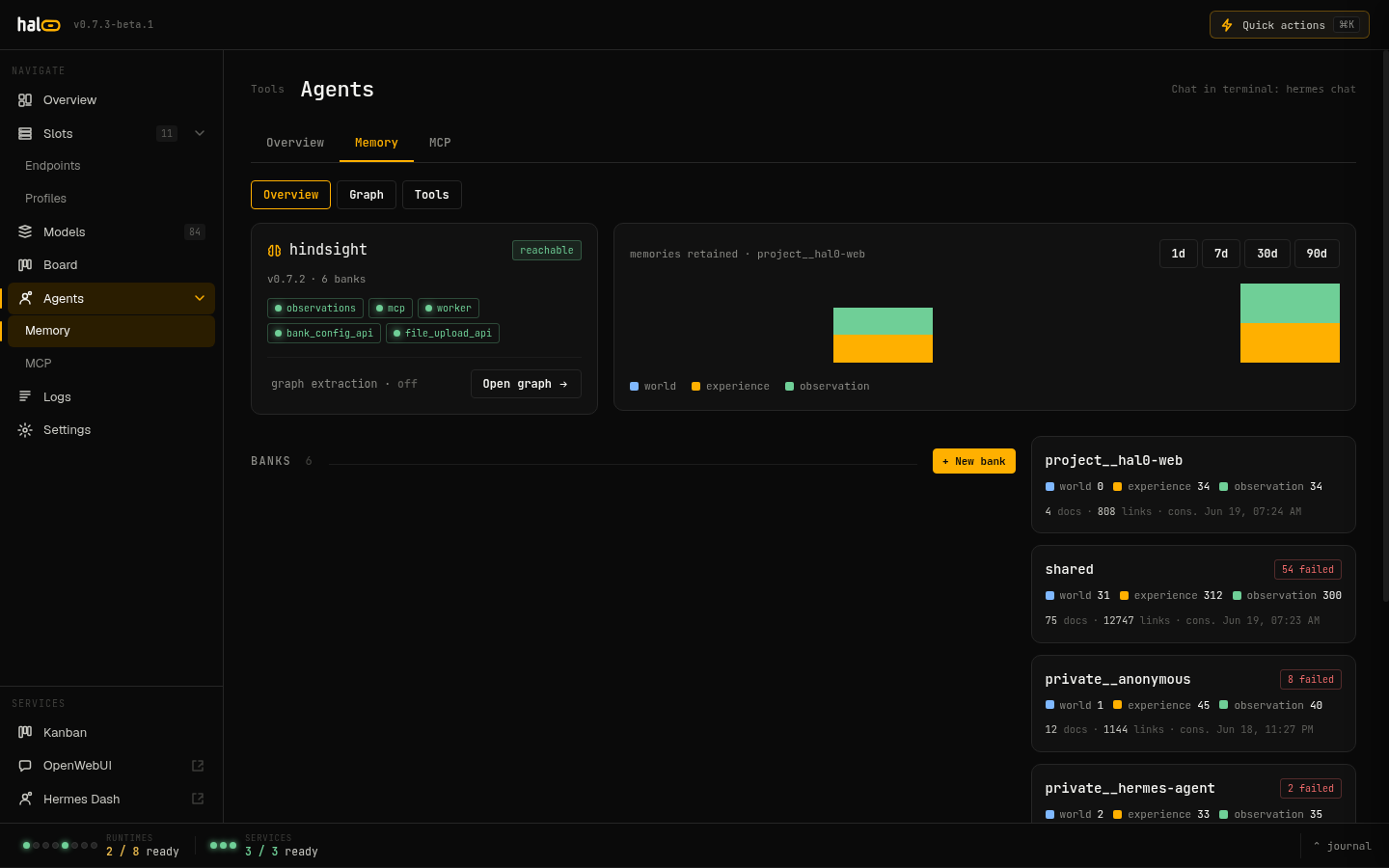 Live memory and graph-extraction dashboard in hal0.
hal0 memory graph statushal0 memory graph status --jsonShows whether extraction is on, the configured extraction slot (and
whether it currently resolves to a live enabled llm slot), the
available slots you could pick instead, and build/error counters.
hal0 memory graph enable # keep the current extraction slothal0 memory graph enable --slot utility # repoint ithal0 memory graph enable --slot agent--slot names a local type=llm slot; it must already be enabled — the
server validates the choice against the live enabled-slot set and rejects
an unknown or non-llm slot before it ever reaches hal0.toml.
hal0 memory graph disableTurns extraction off and cancels any in-flight build. Vector recall is unaffected either way — this gate only controls the graph layer.
Manage banks
Section titled “Manage banks”hal0 memory bank listhal0 memory bank stats <bank>hal0 memory bank profile get <bank>hal0 memory bank profile set <bank> <key> <value>hal0 memory bank export <bank>hal0 memory bank import <bank> <file>hal0 memory bank delete <bank>hal0 memory bank consolidate <bank>Deleting a whole bank requires an explicit confirmation that echoes the bank id back — a plain delete with no confirmation is rejected.
Async operations and mental models
Section titled “Async operations and mental models”hal0 memory ops list # in-flight/recent Hindsight ops: retain, consolidation, refreshhal0 memory ops retry <id>hal0 memory mm list # mental models Hindsight has builthal0 memory mm refresh <id>hal0 memory mm history <id>hal0 memory recall # ad-hoc recall from the CLIMigrate a legacy store
Section titled “Migrate a legacy store”If you previously ran the Cognee-backed memory store, or need to bring per-agent private banks together into the unified bank:
hal0 memory migrate unifyDestructive ops are audited
Section titled “Destructive ops are audited”Every destructive call under /api/memory/* — bank delete, and the
memories/config/document/directive/operation/mental-model delete routes
— records a durable audit row (actor, target, and outcome) so a memory
wipe is attributable after the fact.
Related
Section titled “Related”- Run agents — agents are the main consumer of the memory store.
- Connect MCP servers — the
memory_*tool tiers and the/mcp/memoryserver this guide’s flag gates.