Capabilities & profiles
Three distinct ideas shape every slot in hal0: capabilities describe what you want a slot to do, profiles describe the model-behavior tune it runs with, and the slot itself describes where it runs and how big its context window is. That last split is new in v1.0 — profiles used to carry hardware intent too. Getting the boundary right matters, because it’s now enforced, not just a naming convention.
Capabilities: what a slot does
Section titled “Capabilities: what a slot does”A capability is an overlay the dashboard uses to group related slots under one operator-friendly idea. Rather than make you hand-configure each underlying slot, you pick a capability and its child, and hal0 reconciles the real slot for you. The capability groups are:
| Capability | Children → underlying slot |
|---|---|
embed |
embed → embed, rerank → rerank |
voice |
stt → stt, tts → tts |
img |
img → img |
vision |
vision → vision |
Chat is deliberately not a capability group — it lives in the dedicated chat slot and is configured directly, not through the capability overlay.
The selected capabilities are stored in capabilities.toml. When you apply a
change, the orchestrator computes one atomic change set across both
capabilities.toml and the affected slot TOML — they’re written together so the
two can never drift mid-apply — and only then drives the slot lifecycle:
turning a capability on loads its slot, turning it off unloads it, and changing
the model or device swaps it. On first boot, hal0 seeds capabilities.toml
from whatever the slots already declare, so the overlay reflects reality
immediately.
Profiles: how a slot is tuned
Section titled “Profiles: how a slot is tuned”A profile is a reusable, device-agnostic tune template. It bundles
model-behavior flags — sampler settings, KV-cache type and quantization,
batch/ubatch size, reasoning mode, jinja/chat-template behavior — and nothing
about hardware. As of v1.0, a profile carries no container image and no
placement information at all: no device, no GPU index, no thread count, no
-c/--ctx-size (that flag is on hal0’s own managed-args denylist and can
never appear in a profile’s flags). All of that lives on the
slot.
This is a genuine v1.0 change, not a renaming exercise: pre-1.0 profiles were
identity-bound to a backend (rocm, vulkan, cuda) and carried an image.
The 1.0 seed catalog is organized by workload instead, so the same profile
works regardless of which device a slot targets:
| Profile | Purpose |
|---|---|
chat |
Minimal generic chat — fallback for unknown models |
chat-long-context |
Long-context chat variant (~128K ctx) |
dense |
Generic dense workload (~128K ctx); family quirks live in a dedicated variant, e.g. chadrock-dense |
moe |
Generic MoE workload (~32K ctx); family quirks in e.g. chadrock-moe |
embedding |
Pooled embeddings (--embedding, wide ubatch) |
reranking |
Reranking (--reranking) — always a separate instance from embedding |
cpu-chat |
CPU-safe chat |
flm |
FLM inference on the NPU (chat/embed/STT) |
kokoro |
Text-to-speech (Kokoro), CPU |
qwen3-tts |
Text-to-speech (Qwen3-TTS), GPU |
moonshine |
Speech-to-text (Moonshine), CPU |
comfyui |
Image generation (ComfyUI) |
brain |
The hal0-brain steward workload (small tool-routing model) |
chadrock-dense / chadrock-moe |
Family-tuned recipes for specific dense/MoE model cards (ROCmFP4, MTP, mmproj) |
thinking |
Reasoning-ON workload for reasoning-capable models |
coding |
Code-gen tuned workload |
embedding and reranking are deliberately separate profiles/slots rather than
one server handling both — combining --embedding and --reranking on a
single llama-server instance produces all-zero scores.
Seed profiles are virtual
Section titled “Seed profiles are virtual”Seed profiles live in code, not in /etc/hal0/profiles.toml. On every
load, hal0 overlays the code definition of each seed name over whatever is on
disk — the code definition always wins, even over a stale on-disk copy — and
if profiles.toml is absent entirely, the seeds are still returned in memory,
so the profile catalog is never empty. Saving the catalog back out strips
every seed-named key before writing, so a seed can never accidentally get
pinned to a stale on-disk copy.
Seed profiles are immutable through the API too — updating or deleting a
profile whose name matches a seed is rejected outright. The only way to
customise one is to clone it: the dashboard’s Profiles tab turns “Edit” into
“Edit a copy” for a seed, forking a <seed>-custom profile (with
cloned_from recording the original) that you’re then free to tune; Delete
stays disabled on the seed itself.
Each profile is also classified into a runtime family (llama-server, FLM,
Kokoro, Qwen3-TTS, or ComfyUI) that determines which slot types it can serve,
and profiles are portable: any profile can be exported to a self-contained,
checksummed .hal0profile.json envelope and imported on another host — the
same sharing model stacks use.
Where hardware placement actually lives now: the slot
Section titled “Where hardware placement actually lives now: the slot”This is the section that changed most in v1.0, so it’s worth stating precisely, since a plausible-but-wrong reading — “profiles are entirely inert” — undersells one real nuance below.
A slot carries its own device field — gpu-rocm, gpu-vulkan,
gpu-cuda, cpu, or npu — plus gpu_index, n_gpu_layers, threads, and
binary (which selects a runner/container image family; image_pin is the
escape hatch for a full image override). This “hardware grid” is what the
slot owns exclusively, validated at config-load time so a typo fails fast.
Legacy configs that still set the old overloaded backend field are
auto-promoted to device on load, so old slot TOMLs keep working.
A ProfileConfig still carries two optional fields, device_class and
backend, for back-compat — but as of v1.0 they are inert match-only fit
hints, not a source of runtime configuration:
- None of the 17 shipped seed profiles set either field — they’re device-agnostic by construction.
- When set (on a hand-authored or pre-1.0 profile),
device_classis consulted only as a fit-check signal (surfacing aprofile.device_class_mismatchwarning if it disagrees with the slot’s actual device) andbackendis consulted only as a fallback when a slot has nodeviceset at all — the normal 1.0 case (a slot with a realdevice) always overrides both fields withdevice_to_backend(slot.device). - GPU device-node passthrough — which physical GPU nodes actually get mapped
into the container — is decided from the slot’s
devicealone, not from a profile’s fields. Earlier code paths that still read the profile here have been fixed; a CPU-targeted slot no longer requests real GPU device nodes just because its profile happened to carry a staledevice_class.
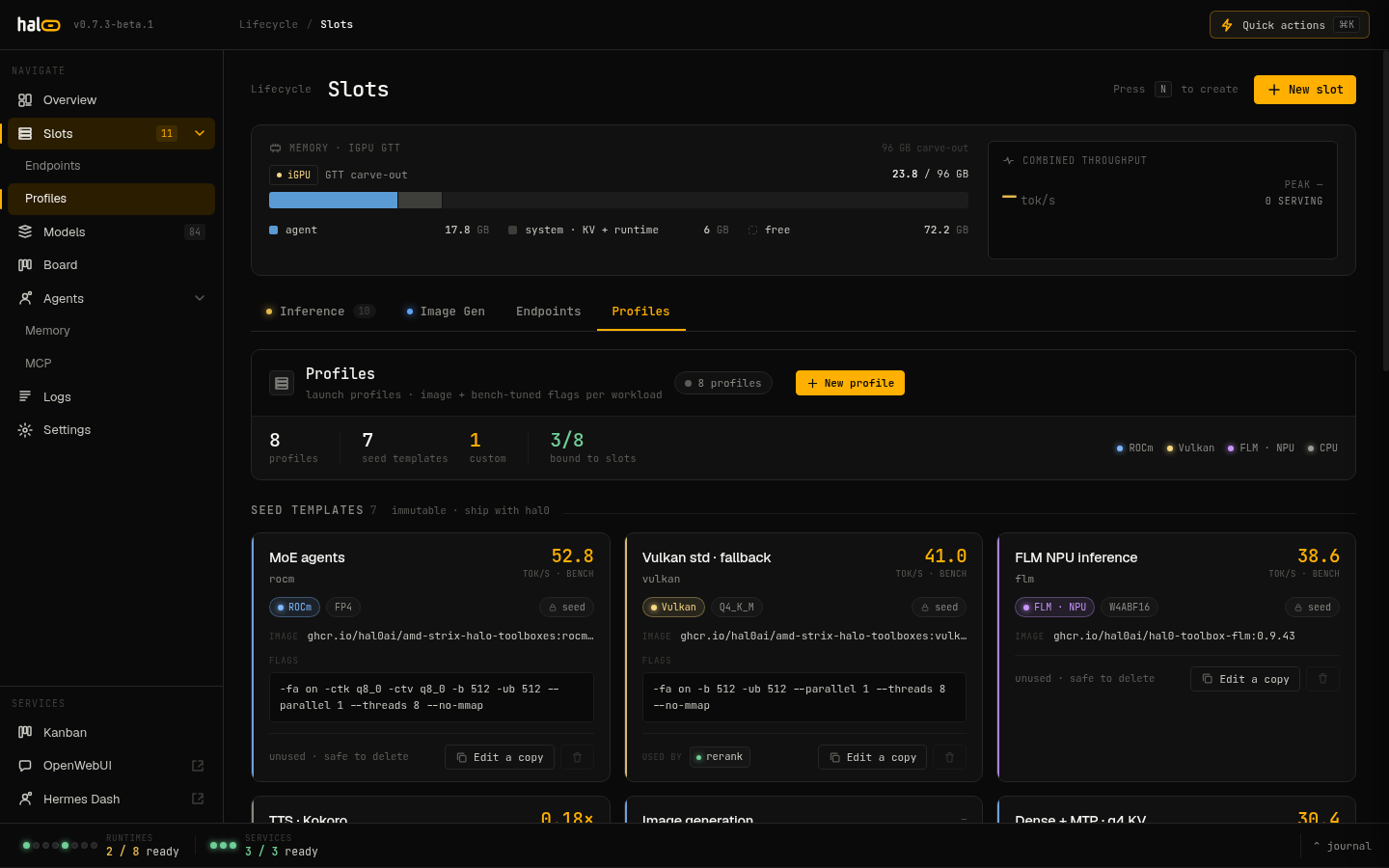
The Profiles tab — seed profile cards with bench metrics, intent labels, and the clone affordance for creating custom profiles.
Flag precedence: how a launch command is assembled
Section titled “Flag precedence: how a launch command is assembled”A container slot’s actual launch command is built from several layers,
concatenated in a fixed order and then deduplicated last-wins per flag
(short and long spellings of the same flag — -b/--batch-size,
-ngl/--n-gpu-layers, -ctk/--cache-type-k, and friends — are treated as
the same key; --lora, --draft-model, and --override-kv are appended,
never deduped, since llama-server treats repeats of those additively):
- base —
--host/--port/--model/--alias/--ctx-size, always present. Context size here is the model’s resolved window, capped by the slot’s own ceiling — see Slots. - profile — the profile’s
flags. - model defaults — the registry model’s
defaults.extra_args(plus-nglfrom the slot, not the model), with the model’s family default (next section) prepended. - chat template / mmproj —
--chat-template-file,--mmproj, resolved from the model. - slot’s own hardware grid —
device/n_gpu_layers/threads, always slot-owned, always applied here. [server].extra_args— hand-authored on the slot itself, always wins last.
The slot Edit drawer’s resolved command panel shows the fully assembled
argv with a per-flag provenance badge, backed by GET /api/slots/{name}/resolved
— the same resolver drives both this preview and the actual launch, so what
you see is what runs.
FAMILY_DEFAULTS — pinning quirky model architectures
Section titled “FAMILY_DEFAULTS — pinning quirky model architectures”Some model architectures need flags no profile should reasonably have to
know about. FAMILY_DEFAULTS is a small, code-only table — virtual like the
seed profiles, never persisted — keyed on model family (detected from a token
scan of the model’s id/filename) that layers architecture-specific overrides
into the model-defaults layer above. Today it has one tenant:
gemma → -ctk f16 -ctv f16 --cache-reuse 0Gemma’s interleaved sliding-window attention regresses under quantized KV cache, so any Gemma model on any q8-KV profile is pinned back to f16 KV with cache-reuse disabled automatically — no per-slot opt-in needed.
MTP: a model × slot decision
Section titled “MTP: a model × slot decision”MTP (multi-token prediction / speculative decoding) is a model capability as of v1.0, not something a profile turns on. It’s resolved from two independent signals:
- Model eligibility — a model is MTP-eligible if the registry
mtptag is set, or anMTPmarker appears in its id/filename as a delimited token (e.g....-mtp-...), gated by the launching runner’s declared MTP support. - Slot override — a slot’s
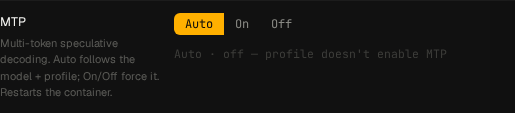
mtpfield is a tri-state:trueforces MTP on,falseforces it off, and unset (Auto) defers to model eligibility.
A profile’s own mtp field still exists on disk for API/round-trip
back-compat, but it is informational only — it is not read by
resolve_profile_flags() or the launch path at all. Two seed profiles happen
to be tuned for MTP-capable model families (chadrock-dense,
chadrock-moe), but that’s a property of what model you’d pair with them, not
something the profile itself switches on.
Resolution: an explicit slot override always wins. Under Auto, MTP is enabled only when the model is eligible. Forcing MTP on a model with no MTP layers at all makes llama-server refuse to start, so only use the override for models you know are genuinely MTP-capable.
In the dashboard, the slot Edit drawer (and each stack row) exposes this as a three-way Auto/On/Off control with a live “Auto · active/inactive” hint.
The NPU trio
Section titled “The NPU trio”The AMD XDNA NPU is driven by FastFlowLM (FLM), and one detail shapes how hal0
uses it: a single flm serve process serves three modalities at once —
chat, speech-to-text, and embeddings. hal0 calls this the NPU trio.
There is one containerized NPU slot. Its chat role routes through the slot’s
upstream like any other slot. The other two modalities ride as shadow slots
— stt and embed — whose requests are posted straight to the same
container’s port when their slot records are enabled. There’s no second process
and no separate model server: the three endpoints are the same FLM process
answering on one static port.
Because the XDNA hardware context admits only one NPU LLM at a time, hal0
enforces NPU exclusivity: you can’t enable a second device=npu chat slot. When
the NPU container isn’t dispatchable, trio requests degrade with a clear
npu.trio_unavailable error rather than failing obscurely.