Pull and register models
hal0 keeps a local model registry — a record of every model it knows about, where its bytes live, and what it can do. You populate it several ways: pull from Hugging Face, register a file you already have on disk, or scan a directory.
Pull from Hugging Face
Section titled “Pull from Hugging Face”hal0 model pull qwen3-4bThe argument is either a curated alias (see Choose models) or a model id already in the registry. The CLI starts a background pull on the daemon, then polls and renders a progress bar until the job finishes. Cancel an in-flight pull with:
hal0 model pull qwen3-4b --cancelThe downloader streams the GGUF into a tempfile, computing SHA-256 as it goes, then atomically moves it into place and upserts the registry entry. Before it streams a multi-GB file, hal0 runs a disk-space preflight against what’s still left to fetch, so a resumed pull only needs room for the remainder.
Resuming an interrupted pull
Section titled “Resuming an interrupted pull”If a pull is interrupted — network drop, hal0-api restart, an OOM kill
— it leaves a deterministic .part file plus a resume sidecar. The next
pull for that model id picks the partial back up with an HTTP Range
request instead of starting over. If the upstream object changed in the
meantime, hal0 detects it via the sidecar’s ETag and restarts the
download clean rather than splicing mismatched bytes.
Pull by Hugging Face coordinates
Section titled “Pull by Hugging Face coordinates”To pull a file that isn’t in the curated catalogue, supply the repo and filename in the body:
curl -X POST http://localhost:8080/api/models/my-qwen-build/pull \ -H 'content-type: application/json' \ -d '{"hf_repo":"unsloth/Qwen3.6-27B-GGUF","hf_filename":"Qwen3.6-27B-UD-Q5_K_XL.gguf","labels":["chat"]}'Check for and apply weight updates
Section titled “Check for and apply weight updates”hal0 model update --check # every model: compares recorded sha256 vs HF Hub, no downloadhal0 model update qwen3-4b --check # one modelhal0 model update qwen3-4b # re-pull that model in placehal0 model update --refresh # force a fresh check, ignoring any cacheRegister a file already on disk
Section titled “Register a file already on disk”If the bytes are already on the host — say you dropped a GGUF into the model store — register it without re-downloading:
hal0 model add qwen3-4b-q4_k_m \ --path /path/to/qwen3-4b-instruct-q4_k_m.gguf \ --name "Qwen3 4B Q4_K_M" \ --license Apache-2.0hal0 model add reads the file’s header to auto-detect id/capabilities/
backends. The old hal0 model register name is a deprecated alias for
the same command. The API also exposes a directory scan that registers
every new file it finds:
hal0 model scanGenerate a draft profile from a model
Section titled “Generate a draft profile from a model”Picking a runtime profile by hand
means guessing which seed template fits a model’s architecture and this
host’s hardware. POST /api/profiles/generate does that guessing for
you — from a model already in the registry, or straight from a HuggingFace
repo you haven’t pulled yet — and hands back a draft to review, not
something already written to the catalog.
# From a registered modelcurl -s -X POST http://localhost:8080/api/profiles/generate \  -H 'content-type: application/json' \  -d '{"model_id": "qwen3-4b-q4_k_m"}' | jq
# From a HuggingFace repo you haven't pulled yetcurl -s -X POST http://localhost:8080/api/profiles/generate \  -H 'content-type: application/json' \  -d '{"hf_repo": "unsloth/Qwen3-8B-GGUF", "name": "my-qwen3"}' | jq
Exactly one of model_id / hf_repo is required (422 otherwise). The
endpoint classifies the model’s capability (chat, embed, rerank, stt, tts,
or image), fits it to this host’s cached hardware snapshot the same way
slot creation’s device auto-pick does, and clones the closest seed
profile — including upgrading a chat model to the moe seed instead of the
flat chat fallback when its architecture (or mtp/a3b tags) says MoE.
A HuggingFace repo also picks up the recommended GGUF variant’s quant and,
when HF reports parsed GGUF metadata for the repo, its architecture and
native context length.
The response wraps a portable .hal0profile.json envelope (the same shape
a profile export produces) plus warnings (anything it had to fall back
on) and sources (where each fact came from):
{ "profile": { "kind": "hal0.profile", "name": "qwen3-4b-q4_k_m", "profile": { "flags": "-fa on --jinja -b 2048 -ub 512", "cloned_from": "chat", "quant": "Q4_K_M", "intent": "Qwen3 4B · qwen3 · 32K ctx · chat · gpu-rocm" } }, "warnings": [], "sources": ["registry:qwen3-4b-q4_k_m"]}Pass "use_llm": true to have the platform’s hal0/utility slot write the
draft’s headline (intent) from the model card instead of the heuristic
one. If the utility slot isn’t loaded, unreachable, or the call times out,
the draft still comes back — with the heuristic headline in place and a
warning explaining why the LLM pass was skipped, never a failed request.
Change or inspect the model store
Section titled “Change or inspect the model store”hal0 model store # show the current model-store directoryhal0 model store /mnt/models # point hal0 at a different directoryhal0 model store /mnt/models --migrate # move existing files there tooThere’s exactly one directory hal0 pulls to, scans, and bind-mounts into containers — this is how you point it somewhere with more room.
List, inspect, and remove
Section titled “List, inspect, and remove”hal0 model listhal0 model list --jsonAggregates the local registry with everything advertised by configured
upstreams. Local files win on id collision and are flagged installed.
hal0 model show qwen3-4bhal0 model show qwen3-4b --jsonhal0 model rm qwen3-4bRemoves the registry row (confirm prompt; --force to skip). The bytes
on disk are never touched — that’s your call. If a slot has this model as
its default, the API cascades: it unloads the slot and clears the
default.
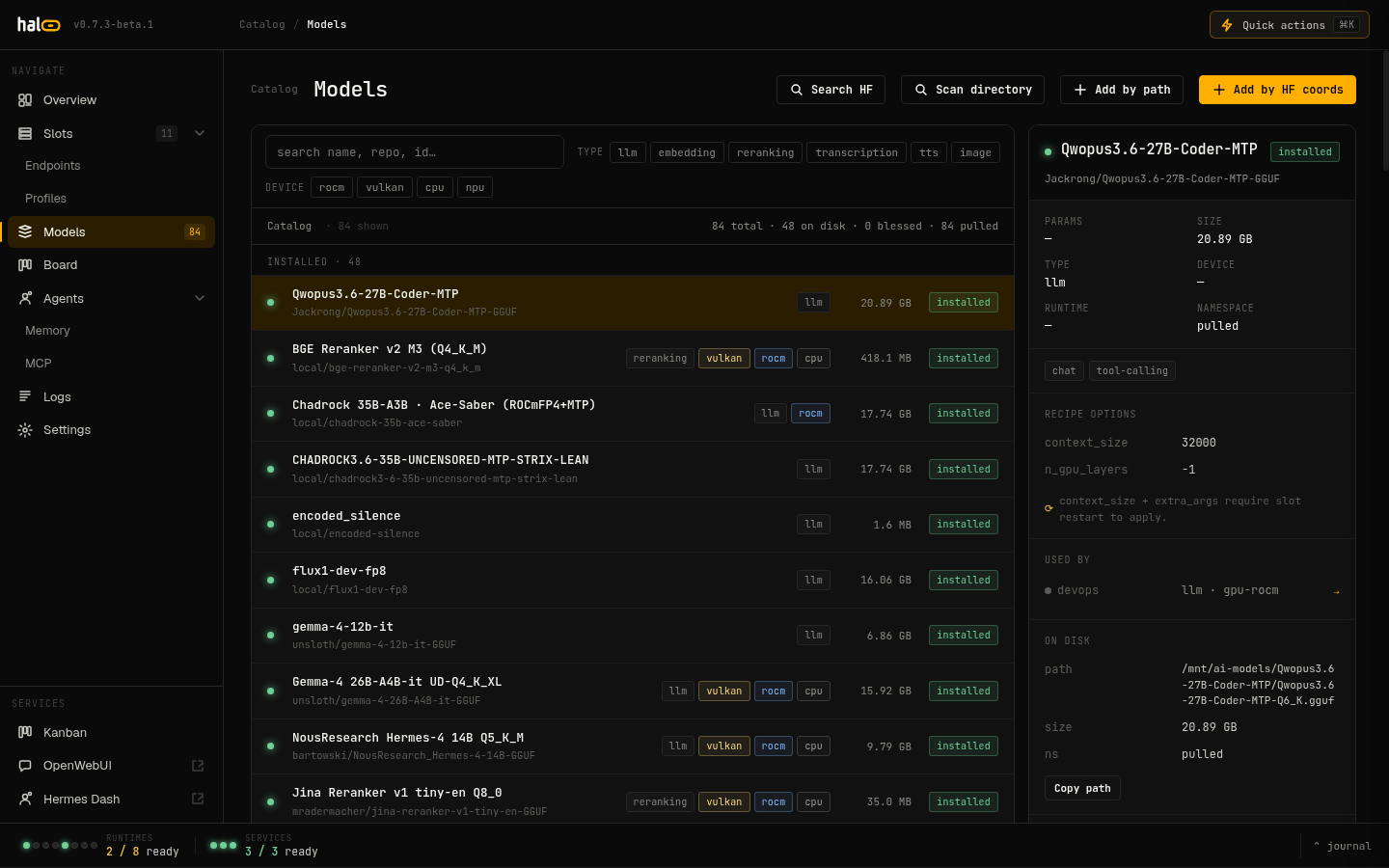 The Models tab lists every installed and upstream-advertised model, with pull-state badges for in-flight downloads.
One-shot: get a model serving
Section titled “One-shot: get a model serving”hal0 model run qwen3-4b --slot agent --timeout 120Assigns the model to a slot, loads it, and polls until it’s ready — the
fastest path from “I have an id” to “it’s serving.” The old
hal0 model assign name is a deprecated alias for
hal0 slot edit --model, which only sets the slot’s default without
loading it.
Restore a pre-registry backup
Section titled “Restore a pre-registry backup”hal0 model import-backup /path/to/backup [--dest /mnt/models] [--force]Disaster-recovery import for a model store captured before hal0’s registry existed — restores files and re-registers them.
The registry on disk
Section titled “The registry on disk”Registry entries are metadata records — id, display name, path, size, SHA-256, capabilities, and the model’s own launch defaults (including an optional preferred profile) — see Choose models. The registry is the source of truth the dispatcher resolves model ids against; the actual weights live in your configured model store.