Keep it off the internet
Never bind the open API where untrusted clients can reach it, auth enabled or not. Front it with a proxy or keep it LAN-only.
hal0’s security posture has two layers, and it’s important not to conflate them: a default posture (open on your LAN, no auth enforced) that hasn’t changed, and a v1.0 auth layer that’s new — real, code-complete, and opt-in. If you last read hal0’s security docs before v1.0, the headline correction is this: hal0 is no longer “no built-in auth, full stop.” It now ships one, off by default, one config write away from on.
The API binds 0.0.0.0:8080 and, out of the box, every endpoint is reachable
by anything that can reach that port — no login screen, no key required.
This was a deliberate call: an earlier design bundled an auth layer and a
TLS-terminating proxy, and that was removed because it duplicated, badly,
what every operator already runs better elsewhere (a real reverse proxy).
The shipped default is still OFF — turning on the layer below is an
explicit operator decision, not something that silently activates.
When you do turn it on, hal0 resolves every request to one of three
principal tiers via AuthPrincipal:
| Tier | What it grants |
|---|---|
anon |
No credential presented, or none configured to check against. |
client |
A valid client key — access to the inference surface (/v1/*) and a short, explicit list of read-only introspection routes. |
admin |
A valid admin key, or a verified dashboard session cookie — full control plane access. |
Credentials are resolved in a fixed priority order: session cookie →
Authorization: Bearer header → ?api_key= query param (the query-param
fallback exists because a browser can’t set a custom header on a WebSocket
upgrade). An admin key presented anywhere a client key would be accepted
still resolves to the more powerful admin tier, rather than being rejected
as “the wrong kind of key.” Key comparison is constant-time
(hmac.compare_digest) to avoid a timing side-channel.
Underneath the principal check is a route exposure table
(AuthClass: OPEN | CLIENT | ADMIN | BOOTSTRAP), evaluated first-match-wins
per request path:
OPEN — a deliberately tiny, enumerated set: the /v1/models SDK
probe, the Prometheus scrape endpoint, liveness checks the installer and
systemd watchdog hit before any credential exists, and the static SPA
shell (same bundle for every visitor, carries no server data).BOOTSTRAP — open only until an admin key is configured (the
installer surface); once HAL0_ADMIN_KEY is set, these routes behave
exactly like ADMIN. This three-state design (unconfigured / configured /
dev-open) exists specifically to avoid a first-run chicken-and-egg lockout.CLIENT — the inference surface plus a short list of genuinely
read-only introspection GETs.ADMIN — everything else, including every mutating route and every
route that can return secrets or config. Unclassified paths fall back to
ADMIN. A newly added router is locked out until a rule is added for it —
that’s the whole point of the ratchet, and it’s backed by a CI test
(tests/security/test_exposure.py) so a route can’t quietly ship
unclassified.require_auth_enabled() resolves the posture in this precedence order:
HAL0_REQUIRE_AUTH environment variable — an explicit runtime override, highest priority.[security].require_auth config toggle — what the dashboard’s Security page writes via PUT /api/auth/require. Picked up on the very next request, no restart needed.Once enabled: configure HAL0_ADMIN_KEY (and optionally HAL0_CLIENT_KEY
for a lower-privilege credential) as environment variables for the hal0-api
service, and present the key via the dashboard login, a Bearer header, or
?api_key=.
Even with auth enabled, hal0’s auth layer is not a TLS terminator and doesn’t replace a real edge proxy. For anything beyond a single trusted LAN, put a reverse proxy (Traefik, nginx) in front of hal0-api:
TLS termination — present a certificate for your chosen hostname and terminate HTTPS at the proxy.
Additional authentication, if you want it (OAuth/OIDC, mTLS, an allowlist) enforced before a request is even forwarded — on top of, not instead of, hal0’s own auth tier if you have both enabled.
Forwarding — proxy the request to hal0-api on 127.0.0.1:8080 (or its
LAN address), and bind hal0 itself so only the proxy can reach it.
The MCP mount enforces a separate network gate. The admin and memory MCP
servers are mounted as sub-applications under /mcp/admin and /mcp/memory,
and the MCP transport applies DNS-rebinding protection.
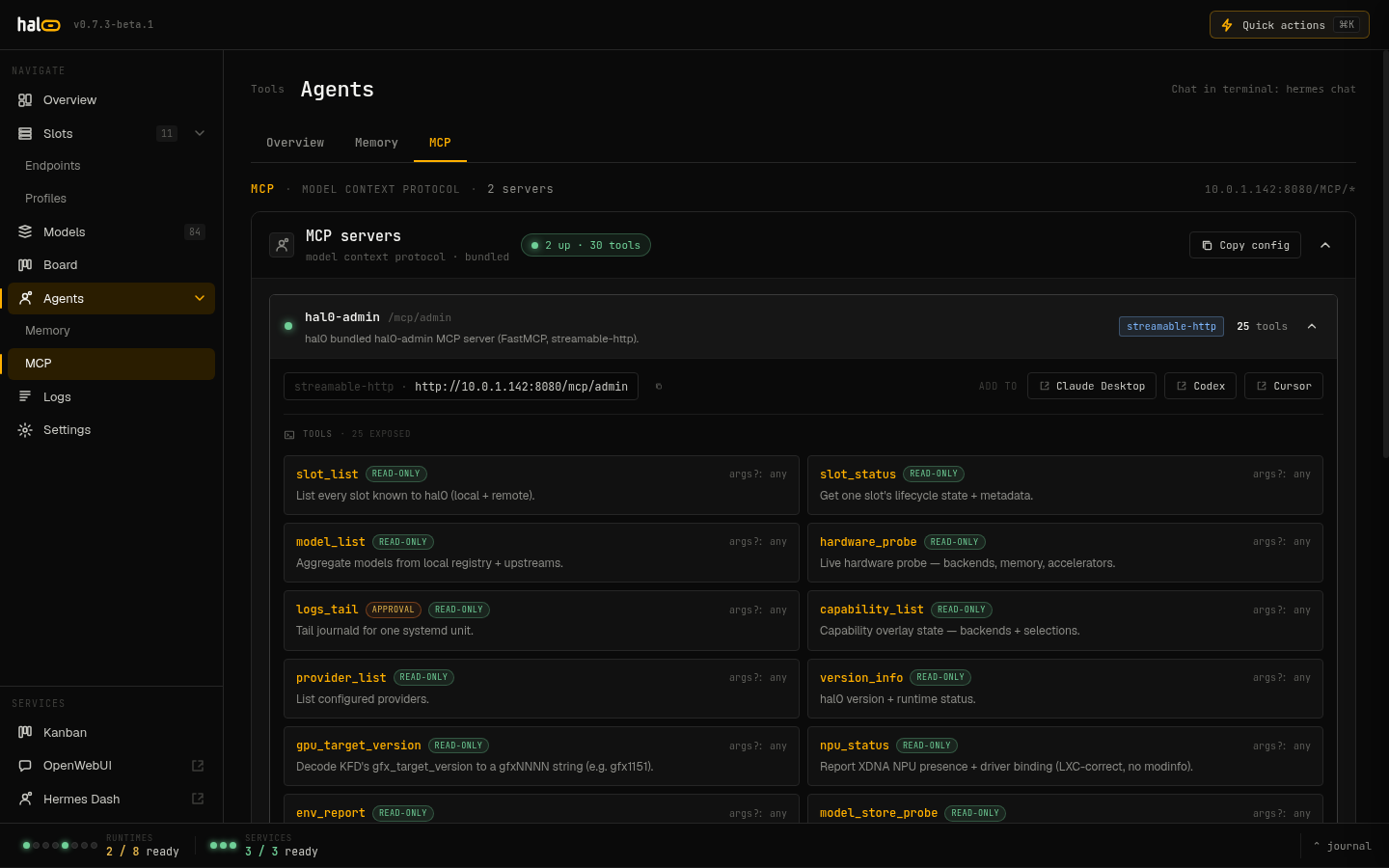 The dashboard’s MCP tab displays the live admin and memory server status.
By default that protection is localhost-only: only 127.0.0.1, localhost,
and [::1] (any port) are accepted as Host headers and request origins. A
client reaching the mount from any other host gets a bare 421 Invalid Host header
response. Because hal0 binds 0.0.0.0 on a LAN, you usually need to widen this
to reach /mcp/* from another machine or through your proxy:
HAL0_MCP_ALLOWED_HOSTS — a comma-separated list of host,
host:port, or host:* values added to the localhost allowlist. The single
value * disables DNS-rebinding protection entirely (the fully-open posture
some LAN-only deployments want).HAL0_MCP_ALLOWED_ORIGINS — a comma-separated list of browser origins.
When left unset, http and https origins are derived automatically from
each host you add, so the dashboard and a reverse-proxy vhost work without a
second knob.This is a host/origin gate, not the auth layer above — it stops a browser on another site from rebinding DNS to reach your loopback MCP server. It composes with the auth tiers, not instead of them.
The agent-chat WebSocket routes carry a second, narrower gate on top of the
MCP allowlist above: every WS upgrade is checked against an origin
allowlist (HAL0_ALLOWED_ORIGINS, comma-separated; the default covers
http://hal0.local, http://localhost:5173, and http://127.0.0.1:8080),
and an HMAC-SHA256 session cookie (hal0_session, HttpOnly,
SameSite=Lax) is minted the first time the dashboard calls
GET /api/agents/{agent_id}/session/handshake and verified on every
WebSocket upgrade after that. This is the same cookie scheme the v1.0 auth
layer reuses for the admin tier — one signing secret
(/var/lib/hal0/agents/secret.bin, mode 0600), one cookie, one place it’s
verified. Caller identity still flows on X-hal0-Agent underneath either
gate.
hal0’s agent and memory surfaces resolve caller identity from the
X-hal0-Agent request header (validated to a bounded [a-zA-Z0-9_-] id),
and the same identity resolves the same memory namespace whether it arrives
over REST or MCP. Privileged or destructive agent actions are gated:
rather than executing immediately, they enqueue an approval that a human
clears from the dashboard, the CLI, or via the approval API. See
Agents for how personas, tool gating, and the
approval queue fit together.
Login attempts are also rate-limited (a login-throttle mechanism in
hal0.security.ratelimit) so a brute-force key guess against an enabled auth
layer doesn’t get unlimited attempts.
Keep it off the internet
Never bind the open API where untrusted clients can reach it, auth enabled or not. Front it with a proxy or keep it LAN-only.
Turn auth on if the LAN isn't fully trusted
Set HAL0_ADMIN_KEY and flip [security].require_auth (or HAL0_REQUIRE_AUTH=1) — it’s off by default.
Terminate TLS at a proxy
Add HTTPS at Traefik / nginx regardless of whether hal0’s own auth is on.
Scope the MCP allowlist
Widen HAL0_MCP_ALLOWED_HOSTS only to the hosts that must reach /mcp/*;
avoid * unless the whole LAN is trusted.